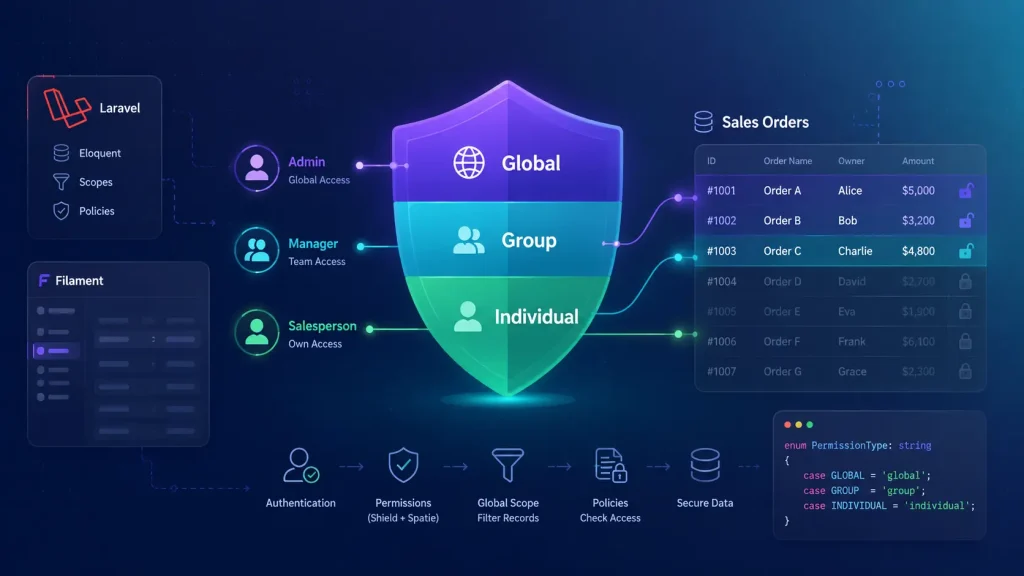
Aureus ERP is a modular ERP built on Laravel and Filament. The moment many roles share one panel, a single question decides if it is usable: who can see which records?
Standard permission tooling answers only half of that. This post covers the other half, and how the Aureus ERP Security module solved it.
Key takeaways
- Filament Shield handles feature permissions (yes/no), not record permissions (which rows).
- Aureus ERP added a permission type: GLOBAL, GROUP, or INDIVIDUAL.
- A single Eloquent global scope filters every list, table, and dropdown automatically.
- Resources and models opt in with one trait each, so there is almost zero boilerplate.
- It stays fully Spatie laravel-permission compatible.
The problem: “can view” is not the same as “can view this”
Most Laravel permission setups, including Filament Shield on top of Spatie laravel-permission, model access as a yes/no flag per action:
view_sales_order, create_sales_order, update_sales_order, delete_sales_order …
That works for features. If a user has view_sales_order, Shield lets them open the screen. The catch is that it lets them see every sales order in the company.
An ERP needs something finer. A salesperson should see only their own orders. A team lead should see their Team’s. An admin should see everything.
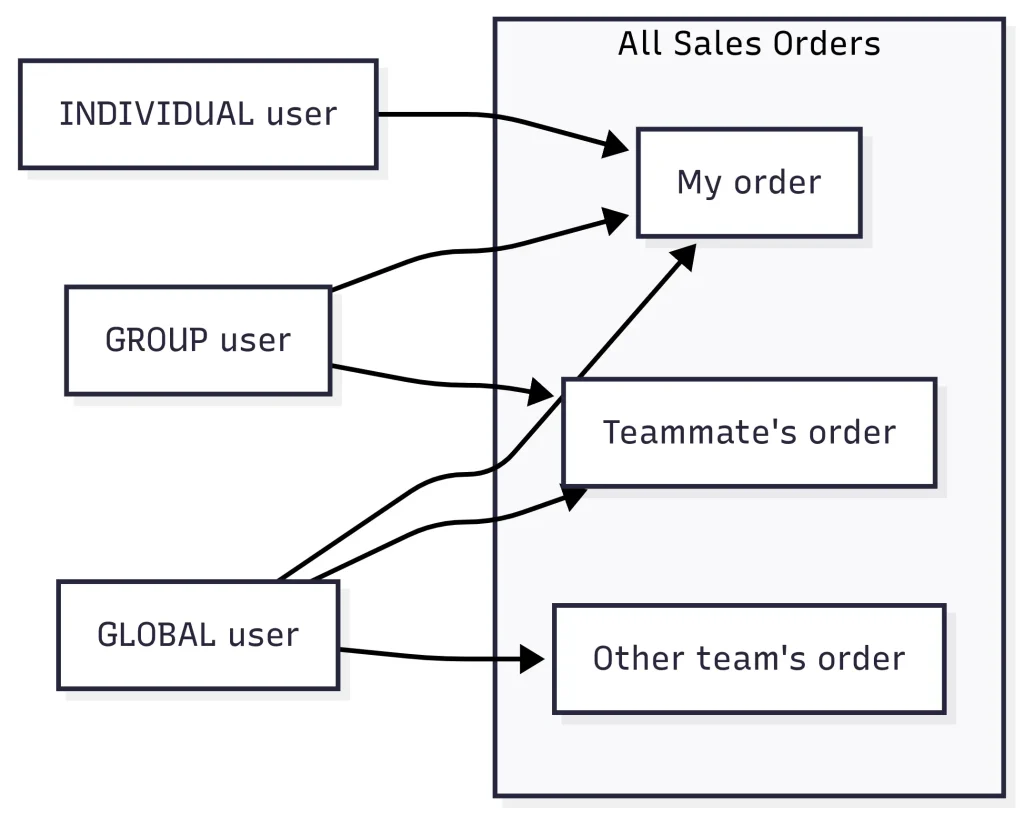
So the requirement was record-level access control, layered on the normal permission check, and applied across every module without rewriting each screen.
What Filament Shield doesn’t support
To be precise about the gap in default Filament Shield:
- No record scoping. Permissions are global, with no “own records only” or “my team’s records”.
- No ownership model. Shield doesn’t know an order has a creator, an assigned user, or a team.
- No team-visibility dimension. Spatie’s “teams” scopes roles per tenant, not records by team.
However, we did not want to drop Shield or Spatie, since roles still do their job. We needed to extend them with a scope.
The core idea: a permission type
The whole design rests on one small enum. Every user carries a resource_permission that says how wide their access is:
|
1 2 3 4 5 6 |
enum PermissionType: string { case GROUP = 'group'; // see records owned by my team(s) case INDIVIDUAL = 'individual'; // see only my own records case GLOBAL = 'global'; // see everything } |
This is the piece Shield lacks: a scope axis on top of the yes/no permission. A role grants what you can do. The permission type decides whose records you can do it to.
Solution part 1: filtering every query with an Eloquent global scope
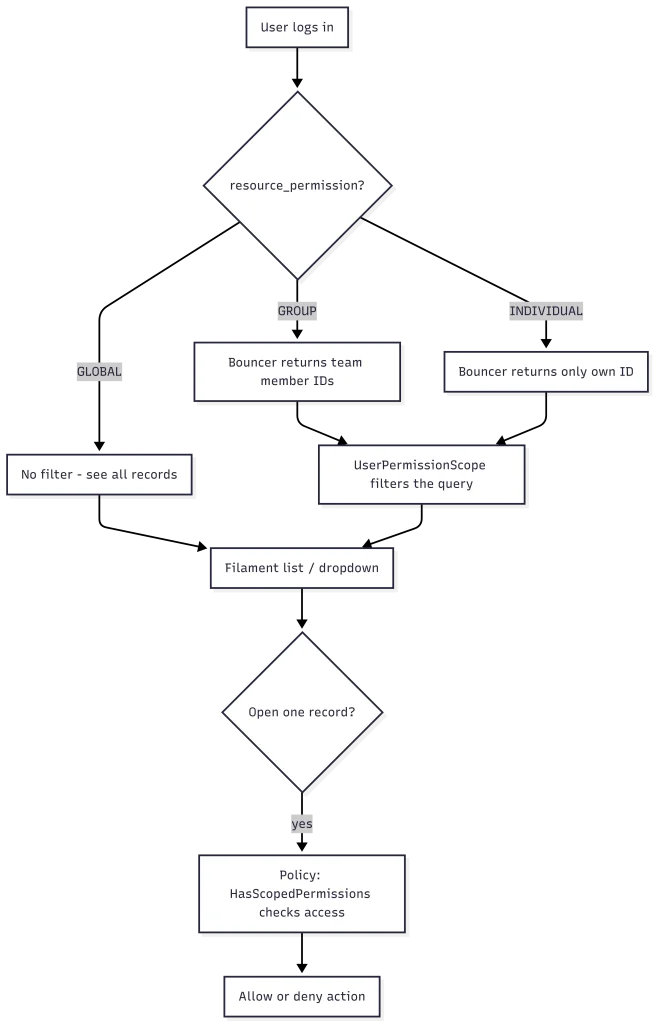
The scope is useless unless every list and dropdown respects it. An Eloquent global scope reads the user’s resource_permission and filters accordingly:
|
1 2 3 4 5 6 7 8 9 10 11 12 13 14 15 16 17 18 19 20 21 22 23 24 25 26 27 28 29 30 31 32 33 34 35 |
class UserPermissionScope implements Scope { public function apply(Builder $builder, Model $model): void { $user = Auth::user(); if (! $user?->resource_permission) { Return; } // GLOBAL -> no filter, see everything if ($user->resource_permission === PermissionType::GLOBAL) { return; } // INDIVIDUAL -> only records the user owns (or follows in Chatter) if ($user->resource_permission === PermissionType::INDIVIDUAL) { $builder->whereHas($this->ownerRelation, fn ($q) => $q->where('users.id', $user->id) ); $builder->orWhereHas('followers', fn ($q) => $q->where('chatter_followers.partner_id', $user->partner_id) ); } // GROUP -> records owned by anyone on the user's team(s) if ($user->resource_permission === PermissionType::GROUP) { $teamIds = $user->teams()->pluck('id'); $builder->whereHas("$this->ownerRelation.teams", fn ($q) => $q->whereIn('teams.id', $teamIds) ); } } } |
Note the touch on INDIVIDUAL: you also see records you follow in Chatter. Collaboration still works even under the tightest scope.
To switch this on for a Filament resource, we drop in one trait that overrides the base query:
|
1 2 3 4 5 6 7 8 9 10 11 12 13 |
trait HasResourcePermissionQuery { public static function getEloquentQuery(): Builder { $query = parent::getEloquentQuery(); if (method_exists($query->getModel(), 'scopeApplyPermissionScope')) { return $query->applyPermissionScope(); } return $query; } } |
That is the whole integration cost per screen. There is no per-resource access logic to maintain.
Solution part 2: one place to resolve “who can I see?”
Each scope needs a different set of allowed users. A small Bouncer service (via a bouncer() helper) resolves and caches that set, so it is not recomputed on every query:
|
1 2 3 4 5 6 7 8 9 10 11 12 13 14 15 16 17 18 |
class Bouncer { public function getAuthorizedUserIds(): ?array { $user = filament()->auth()->user(); if ($user->resource_permission == PermissionType::GLOBAL) { return null; // null = no restriction } if ($user->resource_permission == PermissionType::GROUP) { return $this->getCurrentAccessibleUserIds($user); // team members } return [$user->id]; // individual = just me } } |
Models opt in with a flexible HasPermissionScope trait. It knows how each model stores ownership, whether an owner column (creator_id), an assignment column (user_id), or a pivot table.
Solution part 3: policy checks for a single record
Query scoping hides records from lists. We also need to authorize an action on one record. That policy layer uses a complementary HasScopedPermissions trait:
|
1 2 3 4 5 6 |
protected function hasAccess(User $user, Model $model, string $ownerAttribute = 'user'): bool { return $this->hasGlobalAccess($user) || $this->hasGroupAccess($user, $model, $ownerAttribute) || $this->hasIndividualAccess($user, $model, $ownerAttribute); } |
Same three-way logic of global, group, and individual. Now it answers “may this user touch this record?” inside the policies.
Challenges and how we solved them
- Binary permissions vs. ERP needs. Shield is yes/no; we needed a scope. We added the PermissionType axis and read it everywhere.
- Applying it without rewriting every screen. A global Eloquent scope plus the one-line HasResourcePermissionQuery trait.
- Models store ownership differently. Some use creator_id, some user_id, some a pivot. The configurable HasPermissionScope trait adapts.
- Performance. Recomputing accessible team members per query is wasteful. The Bouncer statically caches the IDs.
- Two different questions. “Which records list?” and “may I edit this one?” are separate, so two cooperating traits handle them.
- Collaboration under tight scope. Strict “own only” would hide relevant work, so Chatter followers join the INDIVIDUAL scope.
We also extended Spatie’s PermissionRegistrar to wire a gate before hook and team-aware checks. Spatie stays the foundation while fitting the ERP’s needs.
Benefits of record-level permissions in Aureus ERP
- True record-level access from a single setting per user: Global, Group, or Individual.
- Consistent everywhere. Every Filament list, relation, and dropdown respects the same scope.
- Almost zero boilerplate. Opt a resource in with one trait, a model in with another.
- Team-based collaboration built in, not bolted on.
- Spatie-compatible. Standard roles and permissions still work, with one dimension added.
Frequently asked questions
Does Filament Shield support record-level permissions?
No. Filament Shield and Spatie laravel-permission grant permissions globally per action. They decide if a user can view a resource, not which records. Aureus ERP adds that layer with a permission type and an Eloquent global scope.
What is the difference between role permissions and record-level permissions?
Role permissions define actions like view, create, update, and delete. Record-level permissions define which records those actions apply to, such as your own, your team’s, or all records.
How does Aureus ERP filter records per user?
Each user has a resource_permission value of Global, Group, or Individual. A global Eloquent scope automatically filters queries based on that access level.
Final thoughts
Filament Shield manages feature permissions, while Aureus ERP extends it with record-level permissions. This ensures users see only the data they’re allowed to access.
A global query scope, policy checks, and a cached Bouncer provide consistent, team-aware access across every module with minimal boilerplate.
Want to see how Aureus ERP can fit your team’s access rules? Tell us about your company and we will walk you through it.
Further reading: Spatie laravel-permission documentation, Filament Shield plugin, Laravel Eloquent query scopes


Be the first to comment.