A warehouse is a place where companies get, keep, organize, and send out their products.
It acts as the main hub for all Inventory Management activities, such as receiving items, moving them internally, delivering them, and handling manufacturing processes.
Additionally, it lets you set up receiving, storage, shipping, restocking, and manufacturing processes based on what your operations require.
Because of this, companies can keep track of their stock correctly, enhance how they fulfill orders, and have better control over their inventory.
Steps to Create a Warehouse
Creating a warehouse in Aureus ERP is easy. Just follow these steps:
Step 1: Navigate to
Inventory → Configuration → Warehouse Management → Warehouses.
You can either view the existing warehouses or click the New Warehouse button to set up a new one.

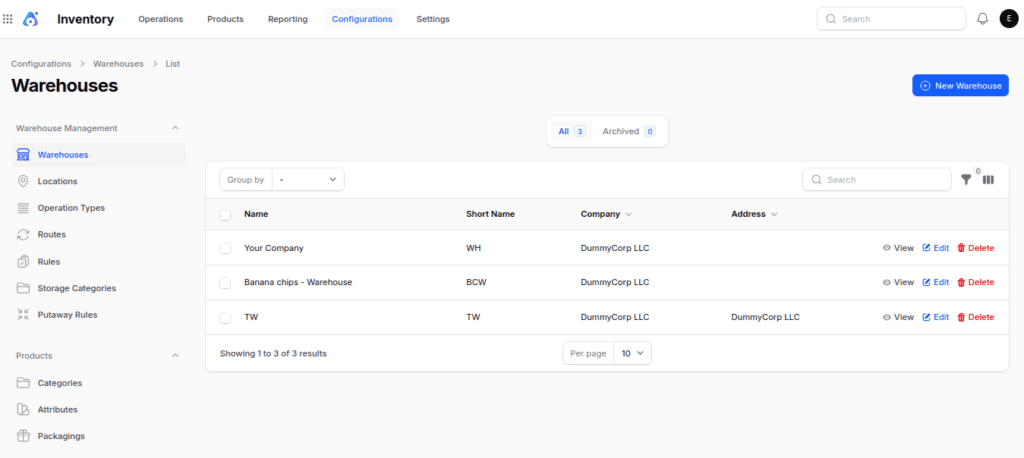
Step 2: Fill in the Warehouse Details
Once you open the form, fill in the necessary details and set up the warehouse settings.
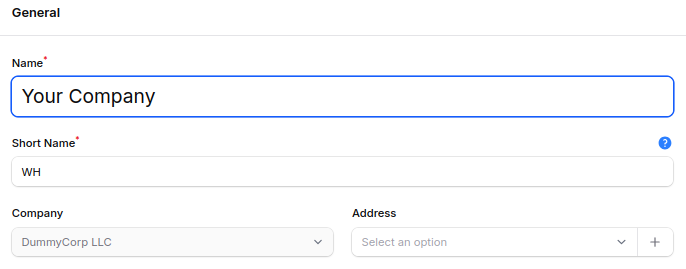
1. General
Name: Enter the warehouse name.
Short Name: Enter a distinct short code for the warehouse. This code is used by Aureus ERP to generate operation references and to identify warehouse operations.
Company: Select the company that is responsible for the warehouse. This detail is important for managing multiple companies in one ERP.
Address: Select the warehouse address. This helps to pinpoint where the warehouse is located.

2. Settings
In the Settings section, you can set how products travel through the warehouse.
Shipment Management
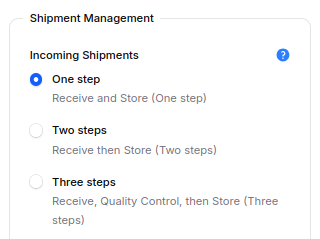
Incoming Shipments
This setting manages how we receive items from suppliers.
- One Step: Receive and Store
- After products are received, they go straight to the storage area. This process works well for basic warehouse tasks.
- Two Steps: Receive then Store
- Products come to the receiving area first.
- Then, users take them to the storage spot. This method helps keep better track of the goods that are coming in.
- Three Steps: Receive, Quality Control, then Store
- Products start in the receiving area. Then, they go to a quality control spot for checking.
- Lastly, the products that pass inspection are sent to storage. This process works best for companies that do quality checks.

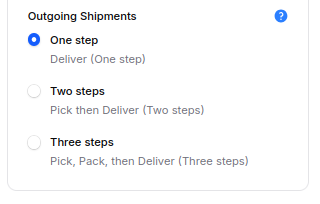
Outgoing Shipments
This choice explains the way products exit the warehouse.
- One Step: Deliver
- Products go straight from storage to the customer.
- This process is effective for straightforward delivery tasks.
- Two Steps: Pick then Deliver
- First, workers take products from storage.
- Then, they bring the products to the customer. This way helps to make sure the picking is more accurate.
- Three Steps: Pick, Pack, then Deliver
- First, workers choose the products. Then, they get them ready for delivery by packing them.
- Finally, the shipment goes to the customer. This process works well for businesses that need to pack items before sending them out.

Resupply Management
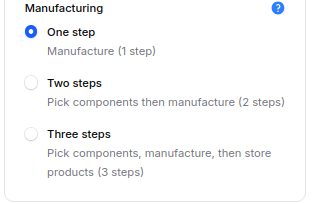
Manufacturing
Choose the manufacturing workflow for products produced in this warehouse.
- One Step: Manufacture
- In one process, parts are used up, and final products are made. This method works well for basic manufacturing.
- Two Steps: Pick Components then Manufacture
- First, workers gather the necessary parts. Then, the system begins the manufacturing process. This method helps improve control over materials.
- Three Steps: Pick Components, Manufacture, then Store Products
- First, workers gather the parts needed for production. Then, they create the final product. Lastly, the system keeps the finished products in the warehouse. This process allows for full control over manufacturing.
Step 3: Create the Warehouse
Once you have filled in all the necessary information and set up the warehouse settings, press the Create button.


The system stores the warehouse information and creates the required operation types and locations according to the chosen setup.
Because of this, the warehouse is prepared to receive, store, transfer, manufacture, and deliver products.
Benefits of Multiple Warehouses
Having many warehouses has a lot of benefits.
- Improves inventory organization.
- Reduces stock shortages.
- Supports location-based order fulfillment.
- Simplifies warehouse replenishment.
- Increases inventory visibility.
- Speeds up delivery operations.
- Enhances purchasing accuracy.
How Warehouses Are Used
Once you set up a warehouse, you can use it for various inventory tasks.
Sales Orders
When you make a Sales Order, go to the Other Information tab. Then, in the shipping section, choose the Warehouse you need.


The system keeps track of and sends out products from the chosen warehouse. This way, you can meet customer orders using the right stock location.
Purchase Orders
When making a Purchase Order, be sure to fill in the Deliver To field. Then, choose the operation type for the warehouse you need.


When the vendor brings the shipment, the system gets the products into the warehouse. This means that inventory is automatically added to the right warehouse.
Internal Transfers
You can shift items from one warehouse to another through Internal Transfers.
First, choose the Internal Location for the source warehouse. Then, pick the Internal Location for the destination warehouse. After that, confirm the transfer.


The system takes stock out of the source warehouse. It then puts that stock into the destination warehouse. This way, the inventory stays correct in both warehouses.
Final words
A properly set up warehouse provides a solid base for effective inventory management.
Additionally, it assists companies in receiving, storing, making, and delivering products more accurately.
Having several warehouses helps manage stock more effectively in various places. This means companies can complete orders quicker and lower the chances of running out of inventory.
When you set up warehouse workflows the right way, it can make daily tasks easier and boost productivity.
So, Aureus ERP assists companies in handling their inventory more effectively and with more assurance.