The Currencies feature in AureusERP helps you manage the currencies you already have and lets you create new ones.
Right now, Aureus ERP supports 169 different currencies, which makes it really useful for businesses that work in many different areas.
Creating a New Currency
Step 1: Navigate to Currencies
Go to Purchase/Sales/Invoice/Accounting module→ Configuration → Purchase orders/Sales orders/Accounting Section → Currencies → New Currency.

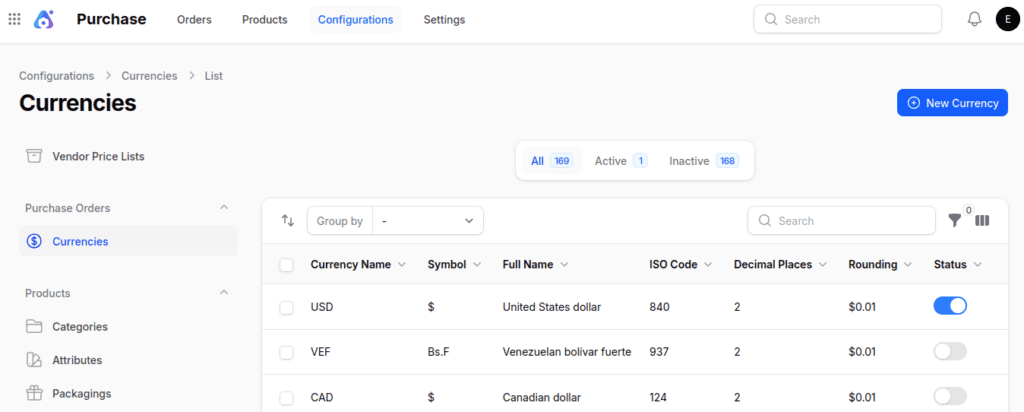
Step 2: Fill in Currency Details
1. Currency Information:
- Currency Name → Short identifier or code (e.g., USD, INR, EUR). Typically the three‑letter ISO code.
- Currency Symbol → Symbol used to represent the currency (e.g., $, ₹, €, ¥).
- Full Name → Complete name of the currency (e.g., United States Dollar, Indian Rupee, Euro).
- ISO Numeric Code → Three‑digit numeric code assigned by ISO 4217 (e.g., USD = 840, INR = 356).
2. Format Configuration:
- Decimal Places → Number of digits shown after the decimal (e.g., USD → 2, JPY → 0).
- Rounding Precision → Rule for rounding values (nearest cent, 0.05, or whole number).
- Example: $10.256 → $10.26 if precision = 0.01.
3. Currency Rates:
- Rates → Recorded exchange values over time for tracking fluctuations and historical analysis.
- Date → The specific date when the exchange rate was valid.
- Unit Per USD → Number of currency units equal to 1 USD (e.g., 1 USD = 83 INR → Unit per USD = 83).
- USD Per Unit → Value of 1 currency unit in USD (e.g., 1 INR = 0.012 USD → USD per Unit = 0.012).
4. Status Toggle: Enable or disable the currency.

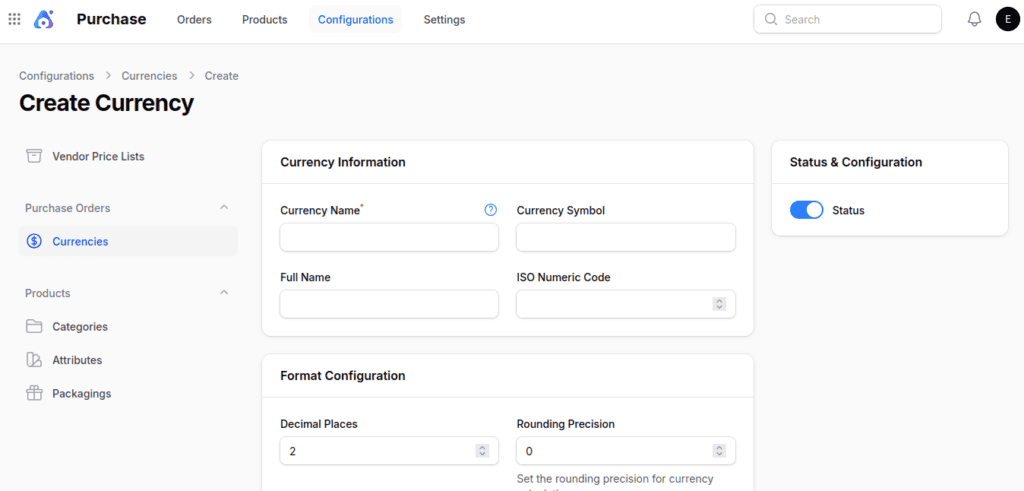
Step 3: Save the Currency
Click Create to finalize the new currency.
Note:
Currencies are used when creating Quotations and Requests for Quotations, which helps make sure that pricing and invoicing are correct in different areas.
Final Words
Handling currencies in Aureus ERP allows companies to manage transactions in various countries more accurately and consistently.
By setting up and managing currencies the right way, businesses can help with buying things from other countries and make sure their financial records match local rules.
Currencies are really important for Purchase Orders, sales orders, and invoicing, making it easier for businesses to operate smoothly.