Every list screen in AureusERP is a table, and people read it differently. One wants low stock, another wants unpaid invoices, another wants this month.
The Table Views plugin adds a row of tabs above any list. Save a filtered view, pin the ones you use, and switch between them with one click.
What a Table Views in AureusERP
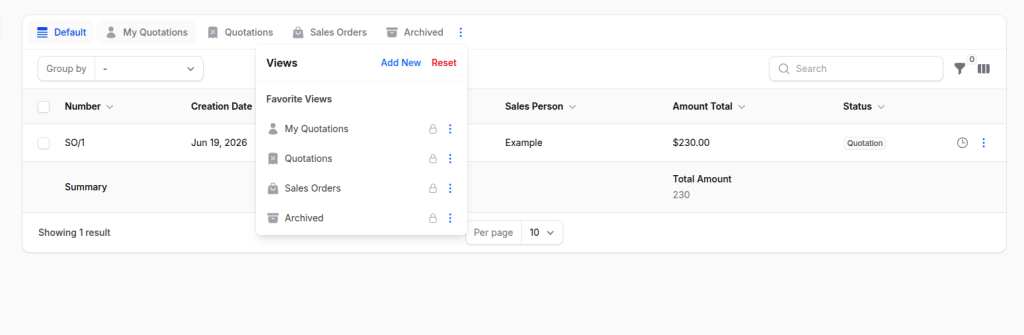
A Table View is one tab on a list. Behind it sits a saved filter, sort, search, and grouping. Click the tab and the list rearranges to match.
There are two kinds:
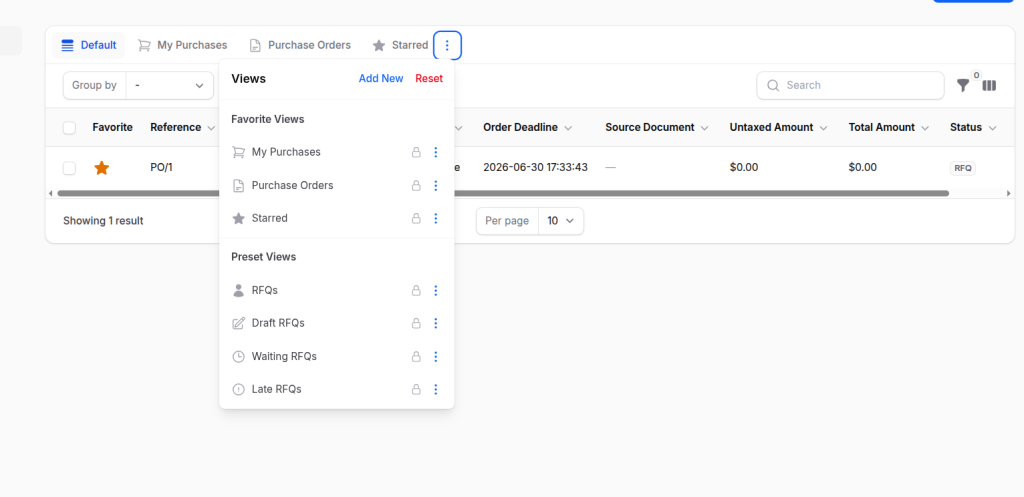
- A preset view is a tab the developer ships with the screen.
- A saved view is a tab a user makes from the screen itself.

What you can customize
This is the heart of the plugin. Each tab can be shaped in several ways.
For a preset view (set in code)
| Option | What it controls |
|---|---|
label() | The text shown on the tab |
icon() | The heroicon next to the label |
color() | The tab color |
favorite() | Pin the tab so it shows by default |
setAsDefault() | Make this the tab the page opens on |
modifyQueryUsing() | The filter rule that decides which rows the tab shows |
For a saved view (set by the user in the UI)
| Option | What it controls |
|---|---|
| Name | The label on the tab |
| Icon | The heroicon for the tab |
| Add to favorites | Whether the tab is pinned for that user |
| Make public | Share with everyone, or keep private |
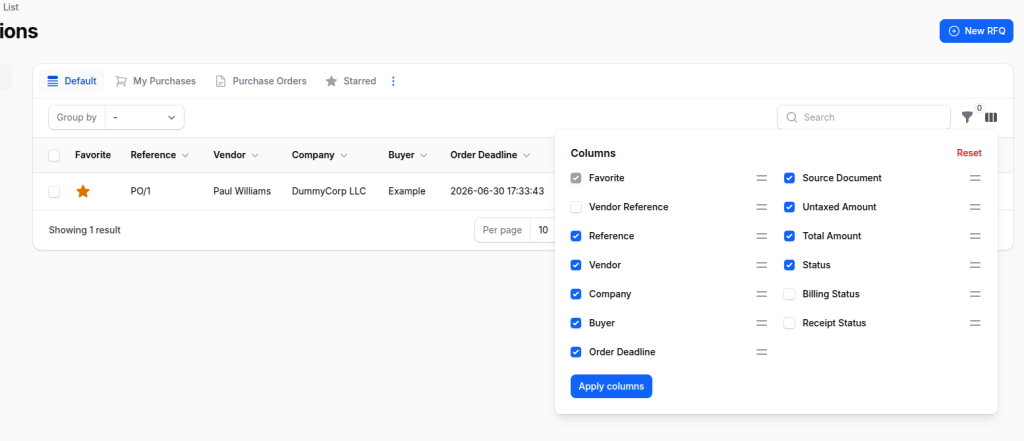
| Filters | Captured automatically from the current table |

Why use it
- Stop repeating yourself. Save a filter once and reuse it with one click.
- Personal by default. Your tabs are yours; teammates keep theirs.
- Share when you want. Make a view public so the team sees one list.
- Open the right list fast. A view can be the default, or opened from a link.
- Almost no code. A developer adds the whole feature with one trait.
How to use it, step by step
Step 1: Add the trait to your list page
Drop the HasTableViews concern on the list page. This one line turns on the tabs, the menu, favorites, and saving.
|
1 2 3 4 5 6 |
use Webkul\TableViews\Filament\Concerns\HasTableViews; class ListProducts extends ListRecords { use HasTableViews; } |
Step 2: Define your preset tabs
Add getPresetTableViews() returning the starter tabs. Each tab is a PresetView with a label and a query rule.
|
1 2 3 4 5 6 7 8 9 10 11 12 13 14 |
use Illuminate\Database\Eloquent\Builder; use Webkul\TableViews\Filament\Components\PresetView; public function getPresetTableViews(): array { return [ 'all' => PresetView::make('All Products') ->favorite() ->setAsDefault(), 'low_stock' => PresetView::make('Low Stock') ->modifyQueryUsing(fn (Builder $query) => $query->where('quantity', '<', 10)), ]; } |
Step 3: Style each tab
Add an icon and a color so the tabs are easy to read at a glance.
|
1 2 3 4 |
'low_stock' => PresetView::make('Low Stock') ->icon('heroicon-o-exclamation-triangle') ->color('danger') ->modifyQueryUsing(fn (Builder $query) => $query->where('quantity', '<', 10)), |
Step 4: Let users save their own views
Nothing extra is needed. The user filters the table, opens the menu, picks Save view, names it, and a new tab appears.
The plugin stores the whole table state, so the tab reopens exactly the same later.
Step 5: Pick what opens first
setAsDefault() decides the tab the page lands on. favorite() decides which tabs stay pinned in the strip.
Everything not favorited stays inside the menu, so the tab row stays short.
Where the data is stored
The plugin uses two small tables.
table_views: the saved views
| Column | Meaning |
name | The label shown on the tab |
| How the tab looks |
| Shared with everyone, or just the owner |
| The full table state (filters, sort, search…) |
| Which screen the view belongs to |
user_id | Who created it |
table_view_favorites: the pinned views
| Column | Meaning |
is_favorite | Pinned or not |
view_type | Preset or Saved |
view_key | Which view this points to |
filterable_type | Which screen |
user_id | Whose favorite it is |

FAQ
Which page classes can use it?
Any Filament list-style page. Add the trait and define the tabs.
|
1 2 3 4 |
class ListInvoices extends ListRecords { use HasTableViews; } |
How do I make one tab open by default?
Call setAsDefault() on it. If none is set, the first favorite opens.
|
1 2 3 |
'open' => PresetView::make('Open Invoices') ->favorite() ->setAsDefault(), |
How do I filter what a preset tab shows?
Use modifyQueryUsing() with a normal Eloquent query.
|
1 2 3 |
'overdue' => PresetView::make('Overdue') ->color('danger') ->modifyQueryUsing(fn (Builder $query) => $query->where('due_date', '<', now())), |
How do I give a tab an icon and color?
Chain icon() and color().
|
1 2 3 |
PresetView::make('Paid') ->icon('heroicon-o-check-circle') ->color('success'); |
Can a saved view be shared with the team?
Yes. The user turns on Make public when saving, which sets is_public to true.
Do I have to wire up the save, edit, and delete buttons?
No. The trait adds Save, Apply, Favorite, Edit, Replace, Delete, and Reset for free.
Where does a saved view keep its filters?
In the filters column of table_views, so the view rebuilds exactly when clicked.
Final word
Table Views is a small plugin that solves a daily annoyance: rebuilding the same filters over and over. Set it up once, and the work disappears.
For developers it is one trait and a few preset tabs. For users it is save, pin, click. Everyone lands on the right list faster, every day.
If your lists feel repetitive, this is a quick win. Add the trait, ship a couple of starter tabs, and let users take it from there.